

Your teams spend hours every week looking things up in SAP, matching documents and chasing people. INK’s AI agents take on that routine work inside SAP Cloud ERP, S/4HANA and SuccessFactors. They use your SAP permissions, ask for approval when it matters, and log everything they do.
Inside SAP
agents that read and act on live SAP data
Any model
SAP Joule or the enterprise AI you already use
You stay in control
permissions, approvals and a full audit trail
Start small
one agent, one process, measured results
Example agents for SAP
Pick your area to see agents that fit it. Tick the ones you’d like to pilot, and we’ll come prepared.
INK to confirm which agents are ready-made and which are built to order
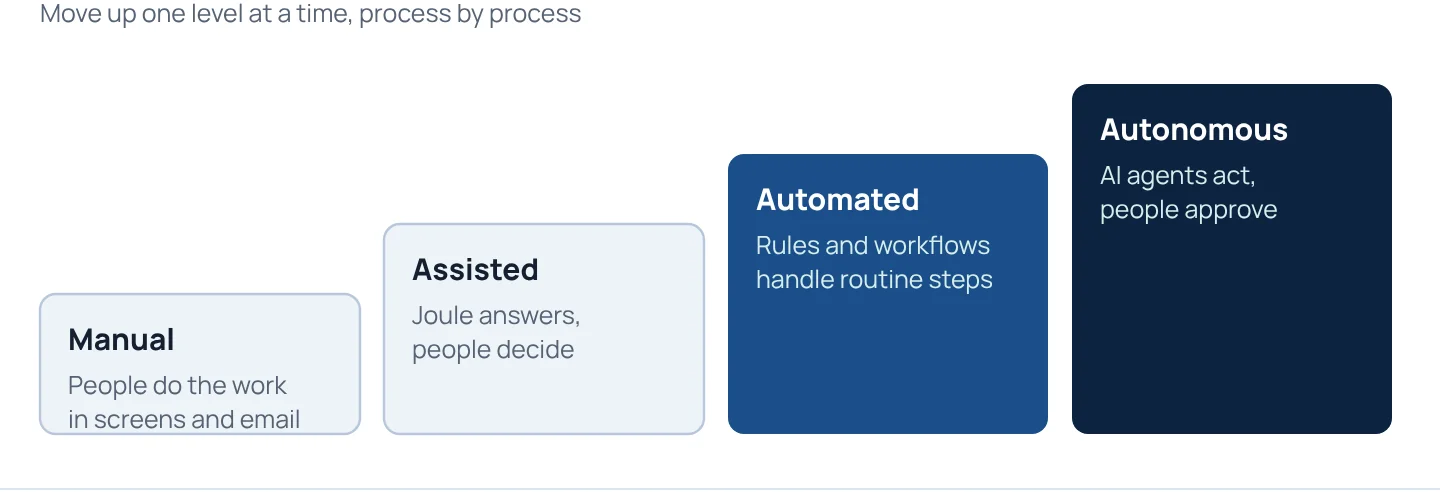
Three levels of autonomy
Every agent starts at the level you are comfortable with, and moves up only when the results prove it.
Reads SAP data and replies. Changes nothing.
Prepares the transaction. A person approves it.
Completes routine cases within rules you set, and hands exceptions to a person.
How it connects
- Your peopleMicrosoft Teams, SAP Joule, web or mobile
- AI modelSAP Joule or your enterprise model
- INK agent layerMCP, permissions, approvals, audit log
- Your SAPSAP Cloud ERP, S/4HANA, SuccessFactors, through standard APIs
Built to be trusted
Your SAP permissions apply
Each agent works with the same role-based access as the person it serves. It cannot see or change more.
Human approval where it matters
You decide which actions an agent can complete and which need a person to approve.
Full audit trail
Every question, answer and action is logged, so you can see what each agent did and why.
Clean core
Agents use SAP’s standard APIs, so your SAP core stays clean and upgrades stay simpler.
Your choice of AI model
SAP Joule, or an enterprise model you already use, connected through the Model Context Protocol (MCP).
Run and improve
We monitor accuracy and cost, and tune each agent as your processes and SAP releases change.
Estimate the time an agent could free up
Enter your own numbers for one task, such as invoice matching or order-status queries.
0
hours freed each month
0
full-time people, at 160 hours a month
A simple estimate from your inputs. The starting values are examples only. We measure the real result in your pilot.
From idea to agent in production
Assess
We review your processes, data and SAP landscape and rank AI use cases by value and effort.
You get: a ranked use-case list
Pilot
We build one agent for one process in our Co-Innovation Lab and test it with your users.
You get: measured results
Scale
We roll the agent out and add the next ones from your list.
You get: agents in daily use
Run
We monitor, support and improve your agents after go-live.
You get: agents that keep working
Find your first agent
Start with an AI readiness assessment, or tell us which process takes your team the most time.
Frequently asked questions
Do we need SAP Joule to use INK agents?
No. We deploy SAP Joule where it fits, and we can also connect an enterprise AI model you already use to SAP through the Model Context Protocol (MCP).
Which SAP systems do the agents work with?
SAP Cloud ERP (public and private edition), S/4HANA and SuccessFactors, through SAP's standard APIs.
Can an agent change data in SAP on its own?
Only if you allow it. Each agent can answer only, draft transactions for a person to approve, or complete routine cases within rules you set.
Is our data used to train AI models?
We use enterprise AI services and review the provider's data terms with you before anything goes live, so you know where your data goes and how it is used.
How do we start?
With an AI readiness assessment or a single pilot agent for one process, built in our Co-Innovation Lab and measured with your users.